Cross-Sections and Transitions
# Copyright 2026 Helge Gehring, Simon Bilodeau and contributors.
# Licensed under the Apache License, Version 2.0.
# ---
# jupyter:
#   jupytext:
#     text_representation:
#       extension: .py
#       format_name: percent
#       format_version: '1.3'
#   kernelspec:
#     display_name: Python 3
#     language: python
#     name: python3
# ---
Cross-Sections and Transitions
In gdswell, the transverse profile of a waveguide is defined by a CrossSection.
This tutorial explains how to create fixed and variable cross-sections and how to smoothly
transition between them.
Basic Concepts
A CrossSection is composed of multiple LayerSection objects. Each LayerSection defines:
layer: The GDS layer and datatype.
width: The width of the section.
offset: The center offset from the path (default is 0).
from enum import Enum

import gdswell as gw
from gdswell.components.bend_circular import bend_circular
from gdswell.components.straight import straight


class Layers(gw.Layer, Enum):
    WG = (1, 0)
    CLADDING = (2, 0)
Defining a Static Cross-Section
Let’s start by defining a simple waveguide with a core and two cladding strips.
# Core layer with 0.5um width
ls_core = gw.LayerSection(name="core", layer=Layers.WG, width=0.5)

# Cladding strips on each side
ls_clad_left = gw.LayerSection(name="clad_left", layer=Layers.CLADDING, width=0.2, offset=-0.6)
ls_clad_right = gw.LayerSection(name="clad_right", layer=Layers.CLADDING, width=0.2, offset=0.6)

# Combine into a CrossSection
xs_standard = gw.CrossSection((ls_core, ls_clad_left, ls_clad_right))
Variable Cross-Sections with 
Width and offset can be functions of the normalized path coordinate gw.S,
which ranges from 0.0 at the start of a path to 1.0 at the end.
This allows for linear and non-linear tapers directly within the cross-section definition.
# A cross-section that tapers its core width from 0.5um to 1.0um
xs_tapered = gw.CrossSection(
    (
        gw.LayerSection(name="core", layer=Layers.WG, width=0.5 + 0.5 * gw.S),
        gw.LayerSection(
            name="clad_left", layer=Layers.CLADDING, width=0.2, offset=-0.6 - 0.25 * gw.S
        ),
        gw.LayerSection(
            name="clad_right", layer=Layers.CLADDING, width=0.2, offset=0.6 + 0.25 * gw.S
        ),
    )
)
Periodic Cells with CellSection
Besides layer-based polygons, a CrossSection can also contain CellSection objects.
These allow you to repeat a specific Cell along the path at a regular interval.
A CellSection defines:
cell: The
gdswell.Cellto be repeated.periodicity: The distance between consecutive cell placements along the path.
x_offset_initial: Distance from the path start to begin placements.
x_offset_final: Distance from the path end to stop placements.
y_offset: Displacement perpendicular to the path center.
@gw.cell
def sample_dot() -> gw.Cell:
    """A small square dot to be repeated."""
    c = gw.Cell()
    c.add_polygon([(0, 0), (0.2, 0), (0.2, 0.2), (0, 0.2)], layer=Layers.WG)
    return c


# A wide cross-section with periodic dots every 2.0um
xs_wide_with_dots = gw.CrossSection(
    layer_sections=(
        gw.LayerSection(name="core", layer=Layers.WG, width=2.0),
        gw.LayerSection(name="clad_left", layer=Layers.CLADDING, width=0.5, offset=-1.5),
        gw.LayerSection(name="clad_right", layer=Layers.CLADDING, width=0.5, offset=1.5),
    ),
    cell_sections=(
        gw.CellSection(
            name="dots",
            cell=sample_dot(),
            periodicity=5.0,
            x_offset_initial=2.0,
            x_offset_final=2.0,
            y_offset=2.0,
        ),
    ),
)
Creating Transitions
You can also create a transition between two different cross-sections using the .transition()
method.
By default, this performs a linear interpolation between matching section names.
# Define a wide cross-section
xs_wide = gw.CrossSection(
    (
        gw.LayerSection(name="core", layer=Layers.WG, width=2.0),
        gw.LayerSection(name="clad_left", layer=Layers.CLADDING, width=0.5, offset=-1.5),
        gw.LayerSection(name="clad_right", layer=Layers.CLADDING, width=0.5, offset=1.5),
    )
)

# Create a transition from standard to wide
xs_trans = xs_standard.transition(xs_wide)
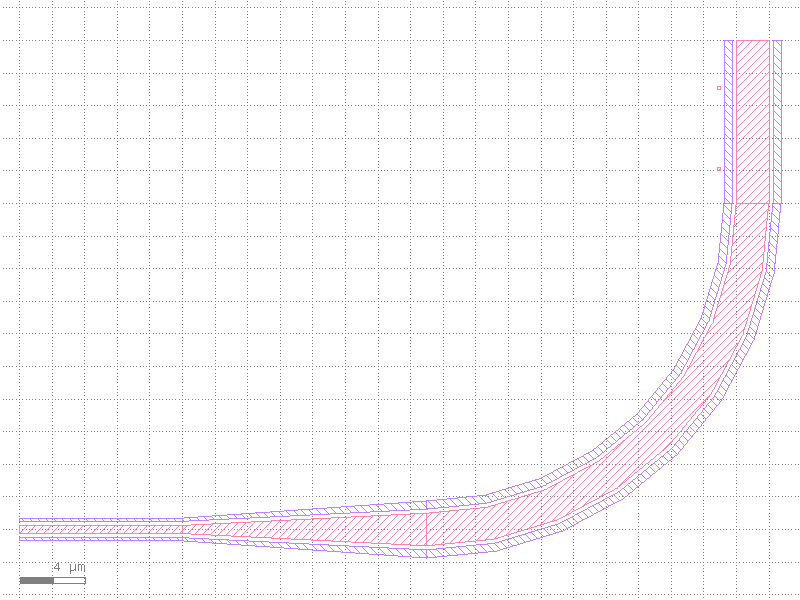
Full Example: Putting it all together
Now we’ll use these cross-sections in various components.
@gw.cell
def cross_section_demo() -> gw.Cell:
    top = gw.Cell()

    # 1. A straight waveguide with our standard cross-section
    s1 = top.add_ref(straight(length=10, cross_section=xs_standard))

    # 2. A taper using the transition cross-section
    t1 = top.add_ref_connected(
        straight(length=15, cross_section=xs_trans), port_name="0", target_port=s1["1"]
    )

    # 3. A bend with the wide cross-section
    b1 = top.add_ref_connected(
        bend_circular(radius=20, angle=90, cross_section=xs_wide),
        port_name="0",
        target_port=t1["1"],
    )

    # 4. A waveguide with periodic dots
    # (Note: Cells are rounded to the nearest 90-degree increment to match path tangent)
    # Since gdswell ignores CellSections in CrossSection comparison, we can connect
    # this dotted waveguide directly to the standard one as long as LayerSections match.
    top.add_ref_connected(
        straight(length=10, cross_section=xs_wide_with_dots),
        port_name="0",
        target_port=b1["1"],
    )

return topVisualization
Rendering the demo cell:
c = cross_section_demo()
gw.Layout.get_active().wait()
c