Smart Layer API
# Copyright 2026 Helge Gehring, Simon Bilodeau and contributors.
# Licensed under the Apache License, Version 2.0.
# ---
# jupyter:
#   jupytext:
#     text_representation:
#       extension: .py
#       format_name: percent
#       format_version: '1.3'
#   kernelspec:
#     display_name: Python 3
#     language: python
#     name: python3
# ---
Smart Layer API
At the heart of gdswell is a powerful, Pythonic geometric engine called the Smart Layer API.
It allows you to define complex layout recipes using standard Python operators and filters,
which are then lazily evaluated and optimized via KLayout’s high-performance Region engine.
Defining Base Layers
Layers are typically defined using an Enum that inherits from gw.Layer.
from enum import Enum

import gdswell as gw


class Layers(gw.Layer, Enum):
    WG = (1, 0)
    CLADDING = (2, 0)
    TRENCH = (3, 0)
    EXCLUDE = (4, 0)
Boolean Operations
You can combine layers using intuitive boolean operators:
+or|: Union-: Difference&: Intersection^: XOR
These operations don’t immediately calculate shapes; they create a Recipe that is executed when you add it to a cell or use it to map shapes.
# Define some recipes
waveguide_and_cladding = Layers.WG + Layers.CLADDING
inner_trench = Layers.TRENCH - Layers.WG
overlap = Layers.WG & Layers.TRENCH
Geometric Transformations
Layers and recipes can be transformed with methods like .size() and .round_corners().
# Enlarge the waveguide by 2.0um to create a wide cladding region
wide_clad = Layers.WG.size(2.0)

# Create a "donut" by subtracting the original from the sized version
donut = wide_clad - Layers.WG

# Round the corners of a trench
smooth_trench = Layers.TRENCH.round_corners(radius1=1.0, radius2=1.0, segments=16)
Interaction Filters
One of the most powerful features is searching for shapes based on their spatial relationship with other layers.
.interacting(other): Shapes that touch or overlapother..inside(other): Shapes completely contained withinother..outside(other): Shapes completely outsideother..overlapping(other, min_count=N): Shapes overlapping with at least N shapes ofother.
# Select only the waveguide segments that are inside a specific exclusion zone
permitted_wg = Layers.WG.outside(Layers.EXCLUDE)

# Find cladding shapes that touch a trench
cladding_near_trench = Layers.CLADDING.interacting(Layers.TRENCH)
Layer Mapping
To actually generate GDS shapes from these recipes,
you use LayerMapping or the .onto() method.
This Maps a recipe to a specific target layer in a cell.
@gw.cell
def smart_layer_demo() -> gw.Cell:
    c = gw.Cell()

    # Let's add some raw data first
    c.add_polygon([(0, 0), (20, 0), (20, 5), (0, 5)], Layers.WG)
    c.add_polygon([(5, -5), (15, -5), (15, 10), (5, 10)], Layers.TRENCH)

    # Now use a recipe to generate new shapes on a different layer
    # We want: (TRENCH - WG) sized by 0.5um, placed on CLADDING layer
    recipe = (Layers.TRENCH - Layers.WG).size(0.5)
    c.add_region(recipe.get_shapes(c), Layers.CLADDING)

    return c
smart_layer_demo()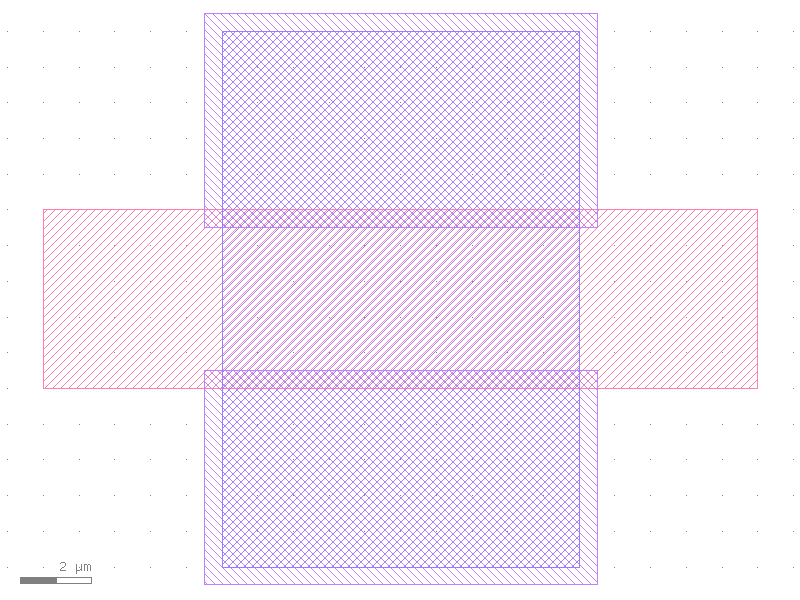
Advanced: Recursive Recipes
Recipes can be arbitrarily nested. gdswell handles the hierarchy by automatically
flattening the required layers locally for the operation.
final_recipe = (Layers.WG + Layers.TRENCH).size(1.0).interacting(Layers.EXCLUDE)
# This will find the union of WG and TRENCH, grow it by 1um,
# and then only keep pieces that touch the EXCLUDE layer.