Ports & Connectivity
# Copyright 2026 Helge Gehring, Simon Bilodeau and contributors.
# Licensed under the Apache License, Version 2.0.
# ---
# jupyter:
#   jupytext:
#     text_representation:
#       extension: .py
#       format_name: percent
#       format_version: '1.3'
#   kernelspec:
#     display_name: Python 3
#     language: python
#     name: python3
# ---
Ports & Connectivity
Ports are the fundamental way to connect components in gdswell. Instead of manual coordinate
math, you define logical connection points (Ports) and use them to snapped components together.
Key Concepts
Ports: A point in space with an orientation and a width.
Cross-Sections: Define the physical properties (layers and widths) of a path.
Connectivity: Use
add_ref_connectedto automatically transform a new component so its port aligns with an existing one.
from enum import Enum

import gdswell as gw
from gdswell.components.bend_circular import bend_circular
from gdswell.components.coupler import coupler
from gdswell.components.straight import straight


class MyLayers(gw.Layer, Enum):
    WG = (1, 0)


# Define a shared cross-section used across examples
DEFAULT_XS = gw.CrossSection((gw.LayerSection("core", MyLayers.WG, 0.5),))
Basic Connectivity
The most common use case is connecting standard components (straights, bends, couplers) by snapping their ports together.
@gw.cell
def basic_connectivity() -> gw.Cell:
    """Demonstrates snapped connectivity using ports."""
    c = gw.Cell()

    # 1. Start with a coupler
    cp = coupler(cross_section=DEFAULT_XS, length=10.0, gap=2.0)
    cp_inst = c.add_ref(cp, origin=(0, 0))

    # 2. Connect a straight waveguide to the coupler's 'w0' port
    # Note: '1' of the straight will be snapped to 'w0' of the coupler
    wg_input = straight(cross_section=DEFAULT_XS, length=20.0)
    c.add_ref_connected(wg_input, port_name="1", target_port=cp_inst["w0"])

    # 3. Connect another straight to 'e0'
    wg_output = straight(cross_section=DEFAULT_XS, length=10.0)
    c.add_ref_connected(wg_output, port_name="0", target_port=cp_inst["e0"])

    # 4. Add a bend to 'e1'
    b1 = bend_circular(cross_section=DEFAULT_XS, radius=5.0, angle=-90.0)
    b1_inst = c.add_ref_connected(b1, port_name="0", target_port=cp_inst["e1"])

    # 5. Add a short straight after the bend
    s1 = straight(cross_section=DEFAULT_XS, length=5.0)
    s1_inst = c.add_ref_connected(s1, port_name="0", target_port=b1_inst["1"])

    # 6. Bend back to horizontal
    b2 = bend_circular(cross_section=DEFAULT_XS, radius=5.0, angle=-90.0)
    c.add_ref_connected(b2, port_name="0", target_port=s1_inst["1"])

    return c
basic_connectivity()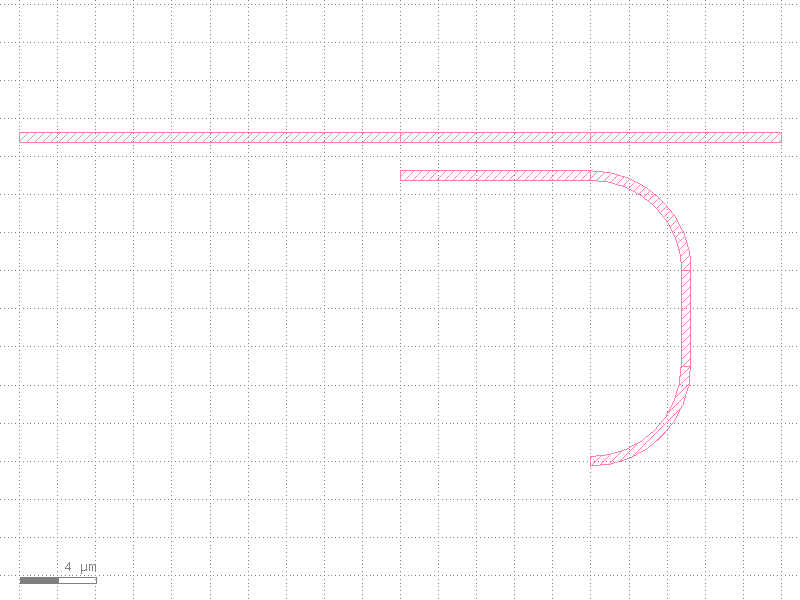
Exposing Ports
When creating a custom cell, you often want to “expose” ports so that they can be used when
instantiating the cell elsewhere. You can manually add ports to a Cell using c.add_port().
This allows you to pick specific internal ports to be the “official” interface of your new cell.
@gw.cell
def simple_arm(length: float = 50.0) -> gw.Cell:
    """A single waveguide arm with descriptive exposed ports."""
    c = gw.Cell()

    # Create a straight waveguide
    wg = straight(cross_section=DEFAULT_XS, length=length)
    wg_inst = c.add_ref(wg)

    # Re-exposing internal ports:
    # We take ports from a sub-instance and add them to our own cell.
    # We rename them to be more descriptive for the user of this cell.
    c.add_port(wg_inst["0"].renamed("input"))
    c.add_port(wg_inst["1"].renamed("output"))

    return c
Composite Systems
Now let’s use our simple_arm in a larger system. Because it has exposed ports (“input” and
“output”), we can use add_ref_connected just like we did with the basic components.
@gw.cell
def composite_system() -> gw.Cell:
    """A system that uses our custom 'simple_arm' component."""
    c = gw.Cell()

    # Add a coupler
    cp = c.add_ref(coupler(cross_section=DEFAULT_XS, length=10.0, gap=2.0))

    # Connect our custom arm to the coupler
    arm = simple_arm(length=100.0)
    c.add_ref_connected(arm, port_name="input", target_port=cp["w1"])

    return c
Inspecting Instance Ports
When you have an Instance, you can access its ports directly using dictionary-style
access (e.g., inst["port_name"]) or via the .ports attribute.
These ports are automatically transformed to the parent coordinate system, meaning their
origin and orientation reflect their actual position in the current cell.
c = composite_system()
arm_inst = c.instances[1]  # The simple_arm we added

# Get a specific port
p_out = arm_inst["output"]
print(f"Port 'output' position: {p_out.position}")
print(f"Port 'output' angle: {p_out.angle}")

# List all transformed ports
for p in arm_inst.ports:
    print(f"Found port: {p.name} at {p.position}")
Port 'output' position: (-100.0, -1.0)
Port 'output' angle: 180.0
Found port: input at (0.0, -1.0)
Found port: output at (-100.0, -1.0)
composite_system()