Routing
# Copyright 2026 Helge Gehring, Simon Bilodeau and contributors.
# Licensed under the Apache License, Version 2.0.
# ---
# jupyter:
#   jupytext:
#     text_representation:
#       extension: .py
#       format_name: percent
#       format_version: '1.3'
#   kernelspec:
#     display_name: Python 3
#     language: python
#     name: python3
# ---Routing
Routing is the process of automatically connecting two ports with a sequence of components
(typically straights and bends). gdswell provides both low-level utilities for manual
chaining and high-level Manhattan routers.
Manual Chaining
chain_components and route_step_by_step allow you to manually define
the sequence of components to be placed between two ports.
from enum import Enum

import gdswell as gw
from gdswell.components.bend_circular import bend_circular
from gdswell.components.straight import straight
from gdswell.routing import (
    route_l,
    route_manhattan,
    route_step_by_step,
    route_u,
    route_z,
)


class MyLayers(gw.Layer, Enum):
    WG = (1, 0)


DEFAULT_XS = gw.CrossSection((gw.LayerSection("core", MyLayers.WG, 0.5),))
Step-by-Step routing
If you know exactly which components you want to use, you can provide them as an iterable to
route_step_by_step.
@gw.cell
def manual_route_example() -> gw.Cell:
    c = gw.Cell()

    # Define two ports to connect
    p1 = gw.Port("p1", (0, 0), 0, DEFAULT_XS)
    p2 = gw.Port("p2", (50, 30), 180, DEFAULT_XS)

    c.add_port(p1)
    c.add_port(p2)

    # Define a sequence of components that will connect p1 and p2
    # In this case: a straight, a 90-degree bend, a straight,
    # a -90-degree bend, and a final straight
    comps = [
        straight(DEFAULT_XS, 10),
        bend_circular(DEFAULT_XS, 10, 90),
        straight(DEFAULT_XS, 10),
        bend_circular(DEFAULT_XS, 10, -90),
        straight(DEFAULT_XS, 20),
    ]

    route_step_by_step(c, p1, p2, comps)

    return c


cell = manual_route_example()
cell.bbox()
cell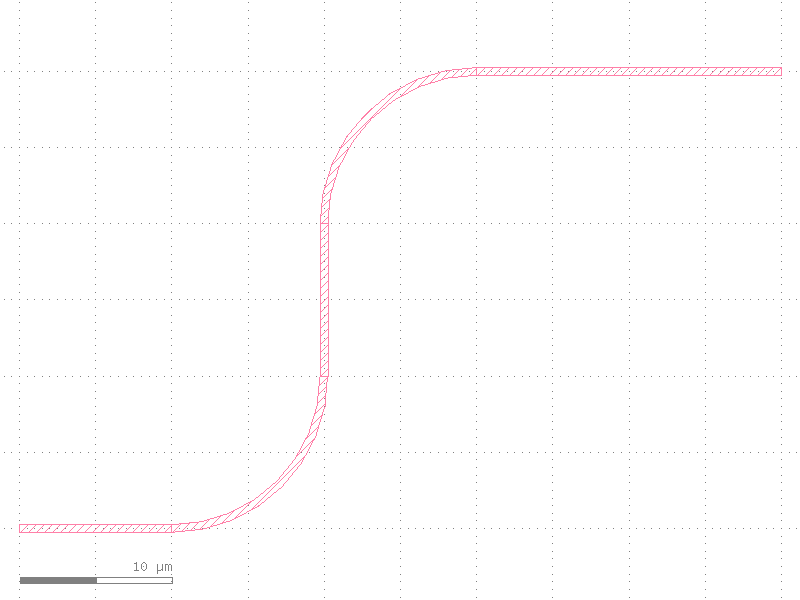
Manhattan Routing
Manhattan routing automatically generates a path using only horizontal and vertical segments.
gdswell supports L-routes, Z-routes, and U-routes.
Automatic Manhattan Routing
The route_manhattan function automatically chooses the appropriate route type (L, Z, or U)
based on the relative positions and orientations of the ports.
@gw.cell
def auto_manhattan_example() -> gw.Cell:
    c = gw.Cell()

    p1 = gw.Port("p1", (0, 0), 0, DEFAULT_XS)
    p2 = gw.Port("p2", (100, 50), 180, DEFAULT_XS)

    c.add_port(p1)
    c.add_port(p2)

    # Automatically chooses a Z-route
    route_manhattan(c, p1, p2, radius=10.0)

    # Z-route with a specific starting straight length
    p3 = gw.Port("p3", (0, -50), 0, DEFAULT_XS)
    p4 = gw.Port("p4", (100, -100), 180, DEFAULT_XS)
    route_manhattan(c, p3, p4, radius=10.0, start_straight_length=30.0)

    return c


cell = auto_manhattan_example()
cell.bbox()
cell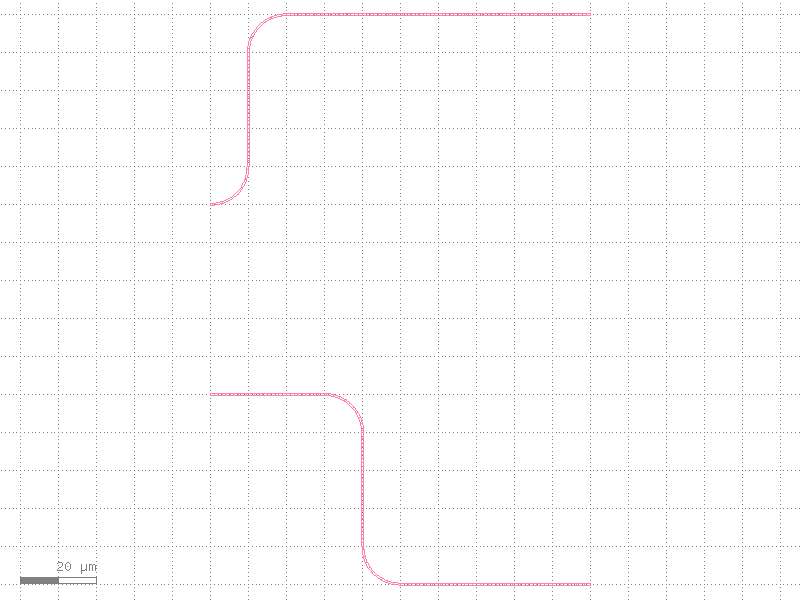
Explicit Route Types
You can also explicitly request a specific Manhattan route type.
@gw.cell
def explicit_manhattan_example() -> gw.Cell:
    c = gw.Cell()

    # L-Route
    p1 = gw.Port("p1", (0, 0), 0, DEFAULT_XS)
    p2 = gw.Port("p2", (50, 50), 90, DEFAULT_XS)
    route_l(c, p1, p2, radius=10.0)

    # Z-Route
    p3 = gw.Port("p3", (0, 100), 0, DEFAULT_XS)
    p4 = gw.Port("p4", (100, 150), 180, DEFAULT_XS)
    route_z(c, p3, p4, radius=10.0)

    # U-Route
    p5 = gw.Port("p5", (0, 200), 0, DEFAULT_XS)
    p6 = gw.Port("p6", (50, 250), 0, DEFAULT_XS)
    route_u(c, p5, p6, radius=10.0)

    return c


cell = explicit_manhattan_example()
cell.bbox()
cell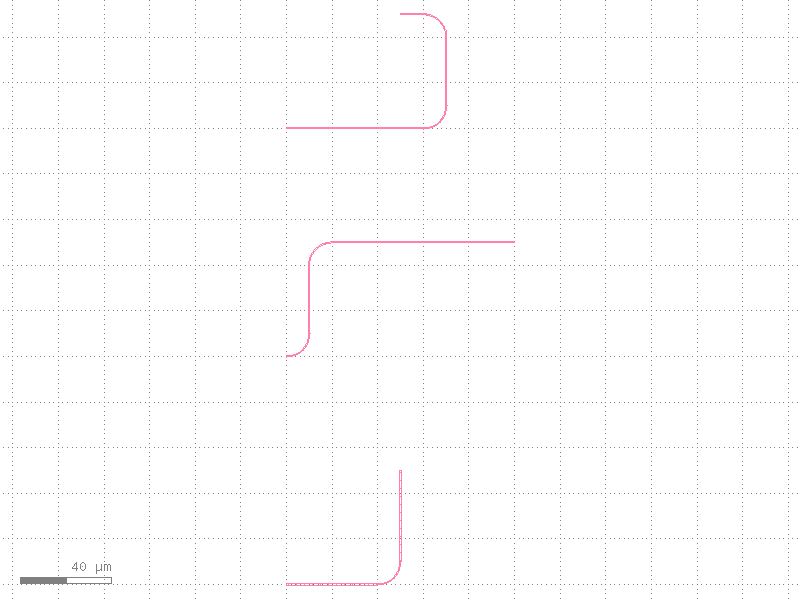
Advanced Features
Custom Factories
You can override the default components used by the routers. This is useful for using non-circular bends (like Euler bends) or custom straight waveguide segments.
from gdswell.components.bend_s import bend_s  # noqa: E402


@gw.cell
def custom_factory_example() -> gw.Cell:
    c = gw.Cell()
    p1 = gw.Port("p1", (0, 0), 0, DEFAULT_XS)
    p2 = gw.Port("p2", (100, 50), 180, DEFAULT_XS)

    # Use an S-bend instead of a circular bend
    # Note: Factories must take (cross_section, ...) as the first arguments.
    route_manhattan(c, p1, p2, radius=20, bend=bend_s)

    return c
Cross-Section Mismatch
By default, gdswell prevents you from connecting ports with different cross-sections
to avoid design errors. However, if you are intentionally transitioning between different
waveguide types (e.g., using a manual taper), you can bypass this check.
@gw.cell
def mismatch_bypass_example() -> gw.Cell:
    c = gw.Cell()

    xs_inner = gw.CrossSection((gw.LayerSection("core", MyLayers.WG, 0.5),))
    xs_outer = gw.CrossSection((gw.LayerSection("core", MyLayers.WG, 1.0),))

    p1 = gw.Port("p1", (0, 0), 0, xs_inner)
    p2 = gw.Port("p2", (100, 50), 180, xs_outer)

    # This would normally raise a ValueError due to cross_section mismatch.
    # We modify p1 to match p2's cross section

    route_manhattan(c, p1, p2.with_cross_section(p1.cross_section), radius=10)

    return c